Monday, 5 September 2016

Saturday, 13 August 2016
Asp.Net Web Service Application in Visual Studio 2015
It took some time to figure me out how to use the webservice in Visual Studio 2015, So blogging it here...
via GIPHY
ASP.NET Web Service Application project template is not available for .Net framework 4.0, however, available for .Net Framework 3.5.


via GIPHY
ASP.NET Web Service Application project template is not available for .Net framework 4.0, however, available for .Net Framework 3.5.
If you want to use ASMX, choose ASP.NET Empty Web application and then you can add ASMX files to the project.
Create a new project targeting the .NET Framework 3.5

Add New Item to the Project.

Now you can start writing your webservice
Thats all for today..!!
Thats all for today..!!
Sunday, 3 July 2016
FIM SQL Group Membership
Do you love SQL and not in favour to invoke powershell Script to get the list of membership of the group in AD ? and want to find the membership of the group in SQL.
And there are SQL query to find the group mebership of FIM Group.
Just run the below SQL query, the name of the group is grouptest.
And there are SQL query to find the group mebership of FIM Group.
Just run the below SQL query, the name of the group is grouptest.
select
displayName,employeeID from
mms_metaverse where object_id
in ( select reference_id
from mms_mv_link where
attribute_name ='member'
and object_id
in (select object_id from
mms_metaverse where displayname in ('grouptest')))
Thanks
Thursday, 23 June 2016
Powershell infinity loop
When you work with
application Support or devlopment, There some times there is a need to
capture the logs occurance of certain activity , however you do not know when
it will occurr and you want alert mails and customized report to generate when
it occur.
You can Scheduled your
script to run in task schedular every minute or second, What you will do when
you do not have the right to update the task schedular or view it?
Scripter more commonly use the for(;;) construct to signify an infinite
loop in Powershell.
In Below Screenshot, the script sleep for every 3 min and invoke the logic of the script.

Thank You.

Saturday, 4 June 2016
ECMA : Get-Schema
Writing my first ECMA connectors with Webservice [ Get-Schema ] ... The road was not easy for a admin to write code or to build connectors for the webservice, During this process I picked C# book and learn the content of Interface and Webservice. For beginer it is recomded to learn the below topic before witing the code.
1. Interface
2. How to call a webservice C#.
Get Schema , While building the connector we have to write the schema.Schema may be define as the field or property of the connector.
The below is the schema code, I hope it help some one in writing the schema of the connectors who want to learn how to build the connector in FIM or MIM.
Here I have two property or filed "FirstNAme" and "SecondName".

The field or Attribute in the connector
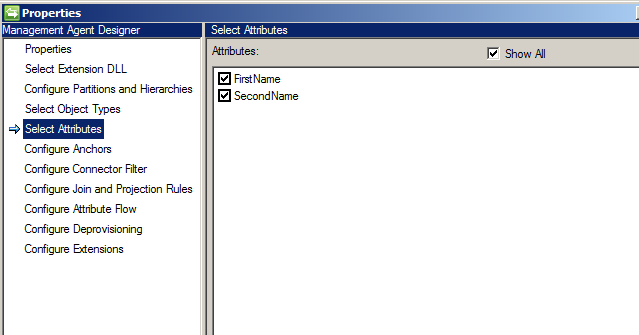
Thats all... for today,.. Happy Coding.
1. Interface
2. How to call a webservice C#.
Get Schema , While building the connector we have to write the schema.Schema may be define as the field or property of the connector.
The below is the schema code, I hope it help some one in writing the schema of the connectors who want to learn how to build the connector in FIM or MIM.
Here I have two property or filed "FirstNAme" and "SecondName".
The field or Attribute in the connector
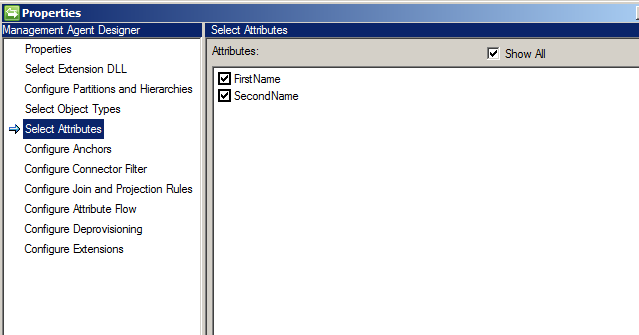
Thats all... for today,.. Happy Coding.
Saturday, 28 May 2016
Do you love Automation
Do you love Automation? If yes then almost all your need can
be fix with PowerShell in FIM & especially in Microsoft World.
The world is changing and from a long time, Microsoft is pushing
automation to the core.. Developers are learning How to build infrastructure, it’s
a High time for the IT Support professional to embrace cloud and Automation.
I am back and stop looking for JOB, I was in believe when i
switch to new profile or company i will get a job what I am looking for, so far
it has not happen with me.
Let’s learn my own and stop looking for Job.
How FIM admin can utilize the power of PowerShell.
FIM or MIM come with PSSnapinin FIMAutomation. However snappin is an
old way of doing things, if we want to have all the cmdlet of FIM we have to registered
the PSSnapinin in PowerShell.
// How to registered the Snappin in Powershell.

Powershell Army is back.
Tuesday, 22 March 2016
Single-Sign on Facebook [Azure]
Azure
Active Directory is not only a directory service in cloud, it is a tool which
Identity Management professional will like in coming days. It providing the
additional feature below.
Single Sign
on.
Multifactor Authentication.
Self-Service password Reset.
Multifactor Authentication.
Self-Service password Reset.
For those
who hate ADFS, you can enable single sign on without ADFS , just you have to sync
the user from on premise AD to Azure AD with the help of Azure AD connect. [Note
Azure AD connect is a lighter version of FIM or MIM].
[[ How to
enable single sign-on to my facebook accounts. ]]
I am
assuming we are pretty much familiar with Azure Portal now..!!
1. In Default Directory click Add an
application.

2. Select facebook from the search option and in
display name filed give appropriate name.

3.
We can see the option facebook application is
added and assign the account facebook application.

4. Here the account RajaVillageSync has been assigned the facebook account.

5. Here I have given my facebook account information.

6. Log out and connect to https://myapps.microsoft.com/ and it will show the list of application for which the single-sign is enabled, Click the facebook icon and it will re-direct the user to facebook.

Subscribe to:
Comments (Atom)

-
 Rules are the construct through which IdentityIQ allows the addition of custom business logic at specific points within the execution fl...
 -
 Note : This series is for the Beginner and trouble shooting the Error With Sync Engine, Based on Test Lab, Highly advice do not do Full Syn...
 -
 This article can be refer as reference only, how can you build your first Management Agent connect to Service Now. The samples code show...